How to Use the Mattermost VPS Template
Mattermost is an open-source, self-hosted messaging platform that provides secure team collaboration for organizations that need full control over their communications. Similar to Slack or Microsoft Teams, it offers real-time messaging, file sharing, and integrations but on your own server. With the Ubuntu 24.04 with Mattermost VPS template, Mattermost comes pre-installed, so you can start collaborating immediately.
Accessing Mattermost
Once your VPS is deployed, you dont need to use SSH for setup. Simply:
Open your VPS dashboard in hPanel.
Click theManage Appbutton.
This will take you to the Mattermost web interface in your browser.

Initial Setup
On your first visit, Mattermost will guide you through the configuration process:
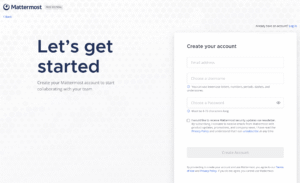
Youll be prompted to create aSystem Adminaccount by entering your email, username, and password.
Set up your firstteamby providing a team name and URL.
This System Admin account will be used to manage all server settings, users, and teams.
Once set up, you can begin creating channels, inviting team members, and configuring integrations.
Using Mattermost
After setup, the Mattermost interface will provide access to:
Channels Create public or private channels for different teams, projects, or topics.
Direct Messages Send private messages to individuals or create group conversations.
File Sharing Upload and share documents, images, and other files within conversations.
Integrations Connect with webhooks, bots, and third-party services to enhance productivity.
Team Management Invite new members, manage permissions, and organize multiple teams.
With the Ubuntu 24.04 with Mattermost template from Hallo-Webseite.de, you can quickly deploy a private, secure messaging platform for your team. Just one click from your VPS dashboard gets you into Mattermost, where you can set up your admin account and start building your collaborative workspace. For advanced configurations, plugins, and mobile apps, visit the officialMattermost documentation.
