How to Use the PrestaShop VPS Template
PrestaShopis an open-source e-commerce platform that allows businesses to create online stores and sell products or services. It provides a user-friendly interface, extensive customization options, and a range of features, making it a popular choice for building and managing online shops.
AtHallo-Webseite.de, we have anUbuntu 24.04 VPS template, which comes withPrestaShopalready installed, so you can easily start creating your online shop with just a few clicks.
To start,install the PrestaShop templateand check the following information:
How to Log In to PrestaShop
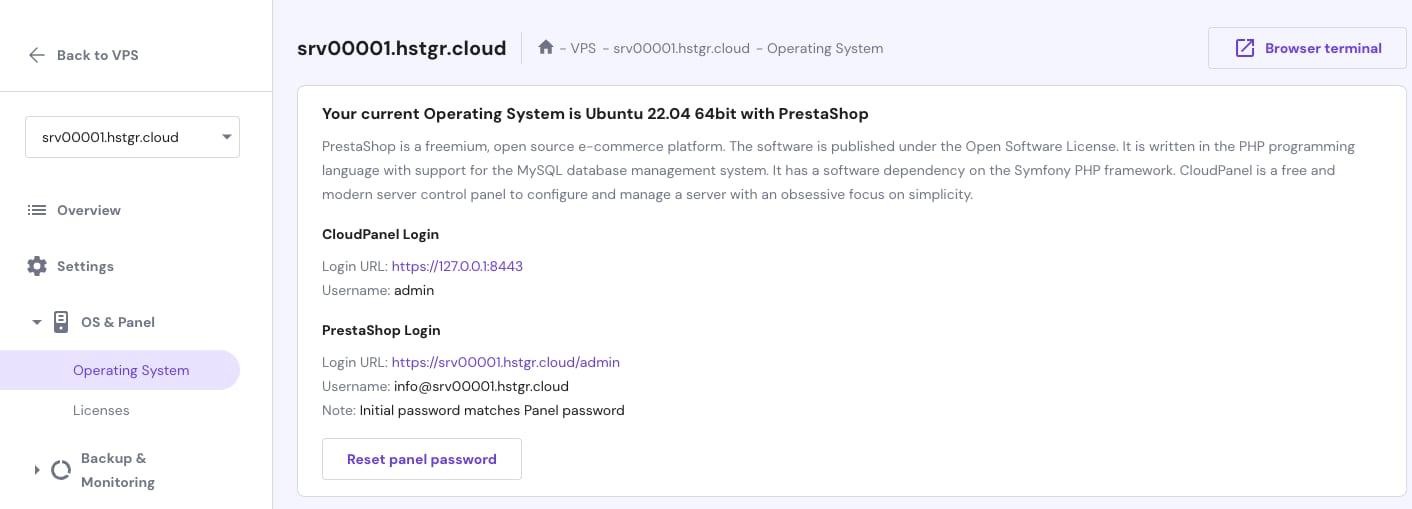
After installing theUbuntu 24.04 with PrestaShoptemplate, use the followingcredentialsto access the PrestaShop admin panel:
Email: info@server-hostname
Password: The one you set during the OS installation. If needed, you can change it by clicking on theReset panel passwordbutton
Important Security Measures
After successfully logging in to the PrestaShop admin panel,change the administrator users email and passwordto enhance security.
Make sure to usestrong, unique passwordsand consider implementingtwo-factor authenticationfor added protection.
How to Change the PrestaShop Domain
Log in to CloudPanel and enter the following address on your browser:
<code>http://vps-ip-address:8443</code>
Replacing
vps-ip-addresswithyour own VPS IP address.If you wish PrestaShop to run on your domain, point it to your VPS IP address,change the server hostname, and reinstall the server ?
