How to Use the Plex VPS Template
Plex Media Serveris free software that allows users to create a client-server for movies, television shows, and music. FreePlexaccounts can share personal media libraries among a users own collection of devices or with friends.Plex Media Serverorganizes movie and television content, including posters, plot summaries, cast and crew lists, technical details, critical reviews, and subtitles. It is also capable of transcoding files if thecodecis incompatible with the device playing the media.
InHallo-Webseite.de, we haveUbuntu 24.04 VPS template, which comes with a pre-installedPlex Media Server. However, before you can connect it to your Plex account, there are two steps you must take ?
If you dont have a VPS yet, consider purchasing one of ourPlex VPS hosting plansto proceed. ?
Step 1 Connect Plex Media Server to Your Plex.tv Account
Create an SSH tunnel from your computer to VPS by entering the following command in your computerTerminal:
<code>ssh root@vps-ip -L 8888:localhost:32400</code>
Make sure to replace
vps-ipwithyour own VPS IP address you can find it in the VPS dashboard.Then, access
http://localhost:8888/webin your web browser and finish setting up your account.Step 2 Upload Media to Your Plex Media Server
You can upload media to the server either via FTP or SSH ?
Option 1 Via FTP
OpenFileZillaand fill in theQuickonnectsection with theSSH accessdetails:
Host: YourVPS IP address
User: root
Port: 22
Once you insert all the required details, click onQuickconnect, and youll connect to the FTP server:

If you encounter theUnknown certificatemessage, select theAlways trust this certificate in future sessionsoption and click onOK:
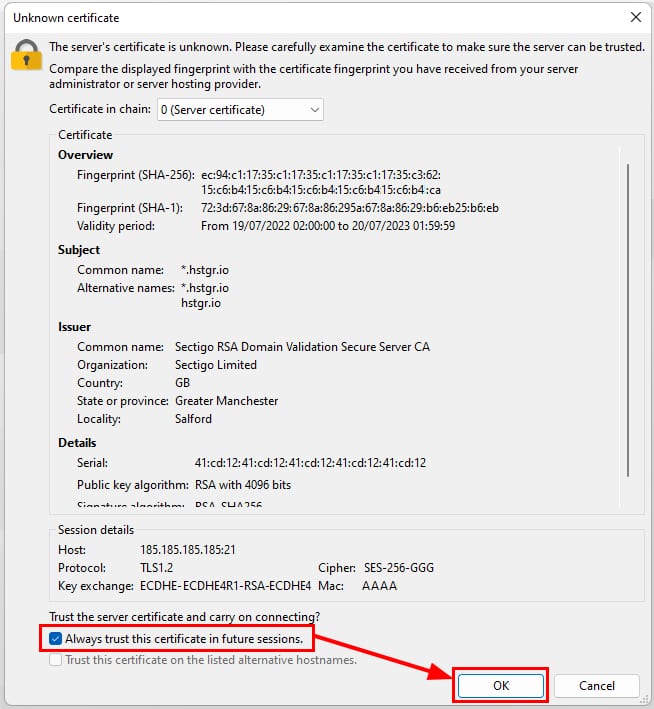
Then, navigate to the folder you want to upload media to (for your convenience, we have created a folder on/home/plexlibrary/) and upload it.
Option 2 Via SSH
SSHis a really efficient and fast way of transferring files from your local computer to the server.
To upload files via SSH, you must belogged out from your server?
OpenTerminal(Linux/macOS) orCommand Prompt/PowerShell(Windows) on your local computer and upload your files using the command format below:
<code>scp -P 22 /home/user/Desktop/[filename] root@vps-ip:the/path/to/folder</code>
Replace
/home/user/Desktop/[filename]withyour local path to the file. An example command from aWindowscomputer would look like this:<code>scp -P 22 C:/Users/MyUser/Desktop/File.txt root@vps-ip:/home/plexlibrary</code>
Once you run this command, youll be asked for theserver root password. Insert the password, and pressEnter.
Wait until the upload is completed, and youre good to go!
