How to change the operating system of your VPS
When you firstactivate your VPS orderright after purchase,you get the option to choose the VPS operating system (OS). If you want to change the OS template for an already active order, you can do so in a few clicks.
Changing or reinstalling the operating system on your VPS will permanently delete all your current data, including the snapshot, if there is any. Make sure to download a backup via FTP beforehand if you wish to keep your information.
Change the operating system
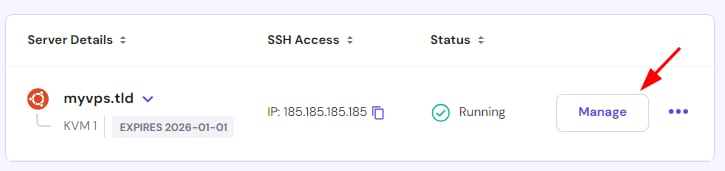
To change your current OS template for a different one, navigate to theVPSsection of your hPanel and click onManagenext to the server:
You will reach theVPS dashboard. Expand theOS & Panelsection on the sidebar and selectOperating System. There, you will find three tabs:
Plain OS only the base operating system, without any software or graphical desktop environment (GUI). This option suits advanced users and users who wish to install a custom panel manually
OS with Panel OS installation that includes a web-based control panel. Some require aseparate license.This option is easier to use compared with plain OS, especially for beginners
Application these are templates that include the automatic installation of applications such as Django, Drupal, Joomla, WordPress, and more
Navigate to the desired tab or use the search bar to find your preferred OS, select the version if applicable, and clickonChange OS:
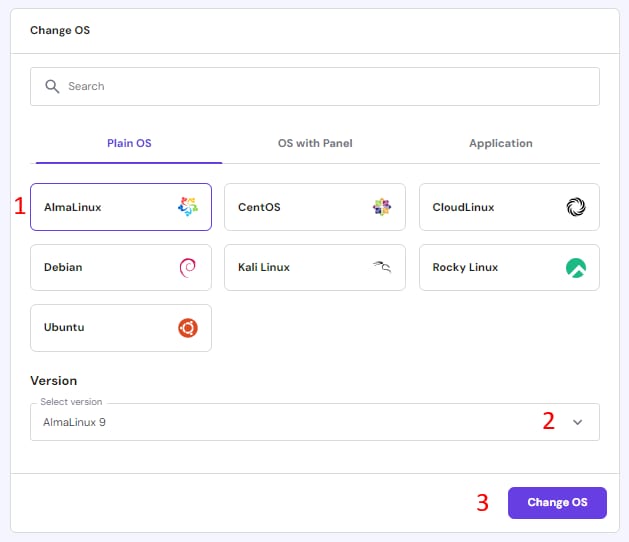
The VPS rebuilding will start,removing any previous data and creating a clean installwith the new OS you selected.
Reinstall the operating system
If you wish to start your VPS from scratch with the same OS and panel you were already using, you can reinstall it. Scroll down to theReinstall your Operating Systemsection on the same page and click onReinstall:
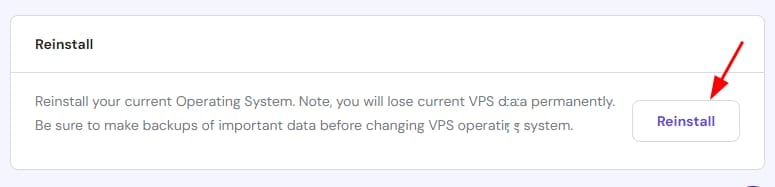
Reinstalling will remove all the current data and snapshot, and rebuild the VPS with the same OS and panel it previously had.
NOTE
Changing or reinstalling the operating system wont affect your existing backups. However,restoring a backupor snapshot created with a different OS will revert your system to the OS that was in use when the backup or snapshot was made.
